
SRTR's New Dial Icons
Coming Soon: Understanding SRTR's New Dial Icons
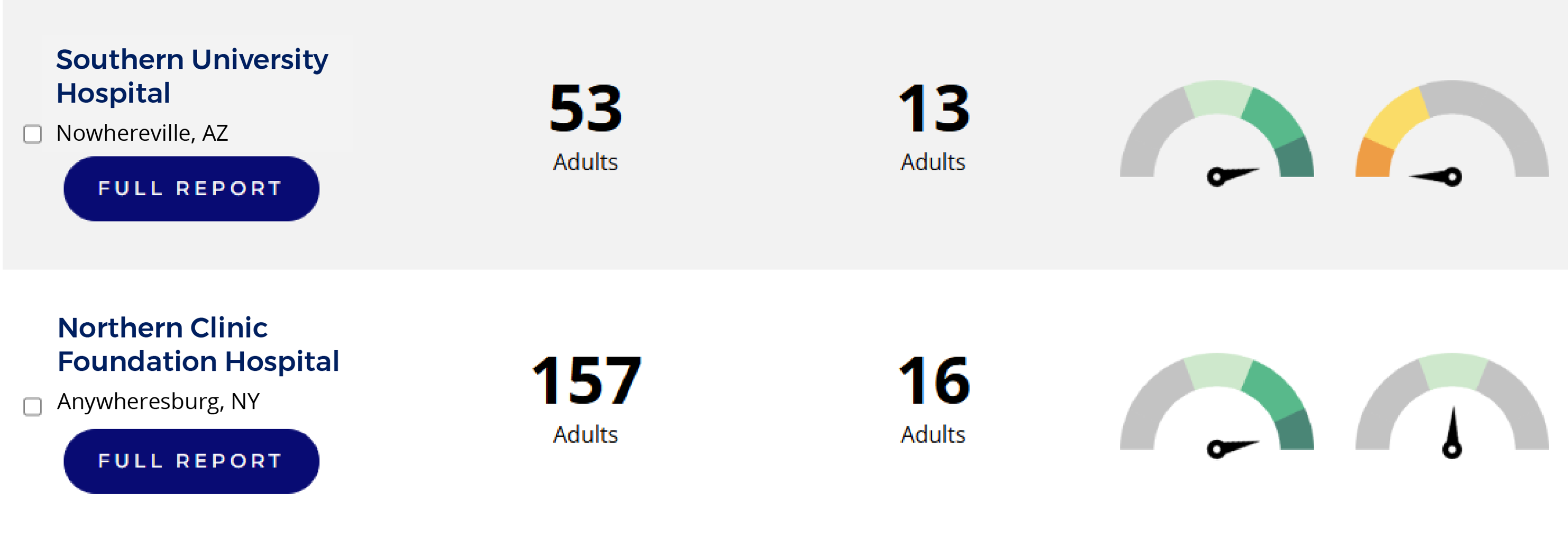
We're updating the visualization of our center-specific reports, replacing the familiar 5-bar icons with new dial icons. This change is designed to provide a clearer, more accurate picture of transplant center performance.
Reasons for the Change
Why Did SRTR Switch from Bar Icons to Dial Icons?
The change was driven directly by feedback from patients and transplant centers. We heard that the old 5-bar icons could be confusing in two key ways:
- Misinterpreted as a Percentage Out of 5: The bars were sometimes seen as a percentage out of five, which was never their intended use.
- Confused with Product Reviews: The icons resembled 5-star product reviews, where anything less than a perfect score can seem negative. This isn't the case with our data.
The new dial icons are designed to prevent this confusion and present the information more accurately.
How Did You Decide on the New Dial Design?
We took a user-centered approach to find the best design:
- Public Testing: We conducted several public surveys, comparing about 12 different icon alternatives. The dial icon proved to be the most effective at addressing concerns with the previous design.
- Expert Review: The new dial icons were reviewed and positively received by several SRTR subcommittees, including the Scientific Review Committee (SRC), the Patient and Family Affairs Subcommittee (PFAS), and the Human-Centered Design Subcommittee (HCDS).
Change Methodology | Same or Different?
Have the Underlying 5-Tier Evaluations Changed?
No. The methodology behind the 5-tier system remains exactly the same.
Since 2016, SRTR has used a complex calculation to evaluate patient outcomes at each transplant center, accounting for the unique health challenges of their patients and donors. Every center gets a score from 0 to 1. These scores are then divided into five tiers to show how a center's performance compares to the national rate for similar patients:
- Tiers 1 & 2: Indicate outcomes that are worse than expected.
- Tier 3: Indicates outcomes that are similar to the national rate.
- Tiers 4 & 5: Indicate outcomes that are better than expected.
The dial icon adds value by showing both the tier (through color) and the center's exact score (through the pointer's position). This gives more detailed information than the bar icons.
How Do the New Icons Affect How Centers Are Sorted on Your Website?
The sorting process is now more precise. Previously, if multiple centers were in the same tier, we had to use a separate "tie-breaker" metric to sort them. Now, because the dial icon displays the center's exact 0-to-1 score, we can use that precise number for sorting. This makes tie-breakers extremely rare and the rankings more accurate.
How Do I Read the New Dial Icons?
It's simple. The dial uses a combination of color and a pointer to give you a quick overview of a center's performance.
- Color Shows Performance:
- Green shades mean the center's outcomes are similar to or better than the national rate. A darker green indicates better performance.
- Orange shades mean the center's outcomes are worse than the national rate. A darker orange indicates worse performance.
- Pointer Shows Exact Score:
- A pointer in the middle means the center's performance is right at the national average.
- A pointer pointing to the left means the center's outcomes are worse than average.
- A pointer pointing to the right means the center's outcomes are better than average.
Future State
Are More Changes Planned?
We are always looking for ways to improve. We've heard feedback that users want to better understand the size of the difference between tiers. While the new dial icons don't directly address this, we are committed to considering additional updates in the future to make our data even more useful.
